MedicalMet's April 2026 update gives clinic owners a single-view owner dashboard for tracking sales performance, revenue by service, outstanding invoices, and top-selling treatments at a glance. We also overhauled the settings glossary so your team can find any configuration page in seconds, and shipped dozens of bug fixes across operations, stocks, products, and appointments. Here is everything that shipped this month.
What Is the New Owner Dashboard?
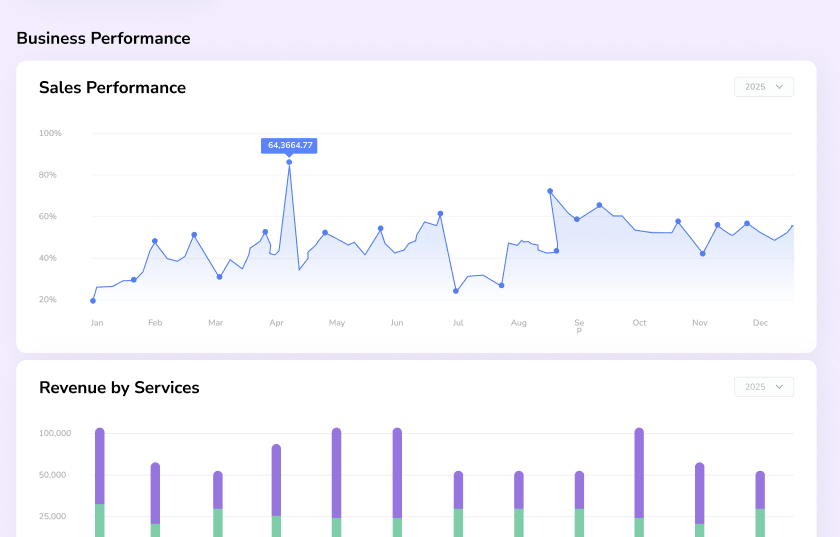
Clinic owners have been asking for one thing for years: stop making me open three reports to understand how the business is doing. The new owner dashboard answers that. When you log in, your homepage now surfaces a live business-performance view — sales trendlines, revenue breakdowns, outstanding invoices, and top services — all on a single screen.
It is designed for the busy clinic owner who does not have time to pull reports, export to Excel, or ask the front desk for figures. Whether you own a single-doctor dental practice in Kuala Lumpur or a multi-branch aesthetic chain across Southeast Asia, the dashboard gives you the same 30-second snapshot of clinic health before the first patient arrives.
What Data Does the Owner Dashboard Track?
Every card on the dashboard is tied to live operational data — no exports, no delays, no stale figures. The initial release includes the metrics owners told us mattered most:
- Sales Performance — monthly sales trendline across the year, with year-over-year comparison and peak-month highlighting for fast pattern spotting.
- Revenue by Services — stacked bar chart showing which service lines (consultations, packages, retail, procedures) are driving the most revenue month by month.
- Top Services — ranked list of your highest-performing services by volume and revenue, so you know what to promote and what to retire.
- Outstanding Invoices — total unpaid balance, aged receivables, and the patients who owe the most — so nothing slips through the cracks.
- Appointment Load — daily and weekly booking density so you can spot capacity gaps before they cost you revenue.
Because the dashboard reads directly from your invoice, appointment, and reports modules, everything you see is real-time. No nightly refresh, no "last updated 6 hours ago" footnote.
How Does the Dashboard Drive Clinic Growth Decisions?
Clinic owners who run the business by gut feel tend to miss the small shifts that matter — a service line quietly losing momentum, an invoice queue growing week on week, a Wednesday afternoon that is always half-empty. The owner dashboard turns those signals into visuals you cannot ignore.
One multi-branch aesthetic clinic in Selangor used an early beta of the dashboard for a month and found that their top two services accounted for 68% of revenue, but only 12% of their marketing spend. That single insight — surfaced by the Revenue by Services chart — reshaped their Q2 promotion plan. That is what a good dashboard is supposed to do: replace guesswork with evidence (MedicalMet customer data, April 2026).
Start Your Day with the Dashboard
Make the owner dashboard your browser home tab. Five minutes each morning reviewing sales trends and outstanding invoices will flag issues before they become revenue leaks.
Why Did We Redesign the Settings Glossary?
Over the past two years, we have added a lot of configuration options to MedicalMet — every new feature we shipped came with its own settings to match the way Southeast Asian clinics actually operate. That depth is a strength, but it came at a cost: customers and our own QA team kept telling us the settings area had become harder to navigate. If you could not remember where a specific option lived, you ended up clicking through five pages to find it.
This month, we rebuilt the settings glossary with a proper search layer. Type what you are looking for — "tax rate", "appointment colour", "WhatsApp template", "panel pricing" — and the glossary instantly surfaces the right configuration page. No more memorising menu paths, no more calling support to ask "where do I change this?"
The search is intent-based, not keyword-exact. Searching for "no-show" will find the appointment reminder and cancellation settings; searching for "receipt" will find invoice template and print layout options. It is the kind of quality-of-life improvement that saves every staff member a few minutes every day — and adds up to hours every week across your team.
What Changed in Operations, Stocks, Products and Appointments?
Alongside the headline features, this release includes a significant batch of bug fixes and performance optimisations across the modules your front desk and back office rely on every day:
- Operations care — resolved several edge cases in the operations workflow that caused inconsistent state when staff multitasked between patient records. Status updates now propagate cleanly across linked views.
- Stocks and inventory — faster load times on large stock lists, fixed a rounding issue in stock value reports, and corrected a rare double-deduction bug when two users dispensed the same batch at the same time.
- Products module — improved product list sorting and filtering, fixed a scenario where price overrides were not respected in bulk edit, and cleaned up duplicate product entries that could appear under certain import conditions.
- Appointments — smoother calendar rendering on large appointment books, a fix for the recurring appointment generator skipping public holidays, and improved reliability for drag-and-drop rescheduling across multi-practitioner views.
None of these fixes are glamorous on their own. But taken together, they remove the small papercuts that slow your team down during a busy Saturday morning rush.
“Owners should not need to run three reports to know how the business is doing. A good dashboard tells you the truth in thirty seconds — and a good settings page lets you act on it in two clicks.”
— MedicalMet Team
How Often Does MedicalMet Ship Updates?
Most clinic software vendors release updates quarterly or annually. MedicalMet ships every single week. That means bugs get fixed faster, feature requests move from "on the roadmap" to "live in production" in weeks instead of quarters, and your clinic benefits from a platform that evolves at the pace your practice does.
Every update is deployed automatically to the 3,000+ healthcare professionals who trust MedicalMet across Malaysia, Singapore, Brunei, the Philippines, Thailand, and Vietnam. No manual downloads. No downtime. No IT ticket. When your front desk logs in tomorrow morning, the owner dashboard, the new settings search, and every fix in this release are already waiting for them.

MedicalMet Team
Official Blog